README.md
(开头部分) 7KB这里只显示每个文件的开头 60 行。登录后可以解锁完整代码。
# iotgateway
## [iotgateway在线体验](http://42.193.160.84:518/)访问:http://42.193.160.84:518/
## [iotgateway教程文档](http://42.193.160.84/)访问:http://iotgateway.net/
基于.net6的跨平台物联网网关。通过可视化配置,轻松的连接到你的任何设备和系统(如PLC、扫码枪、CNC、数据库、串口设备、上位机、OPC Server、OPC UA Server、Mqtt Server等),从而与 Thingsboard、IoTSharp、ThingsCloud或您自己的物联网平台进行双向数据通讯。提供简单的驱动开发接口;当然也可以进行边缘计算。
* 抛砖引玉,共同进步
* 基于.net6的开源物联网网关
* 浏览器可视化的配置方式实现数据采集(使用wtm开发)
* 物联网网关mqtt+opcua双通道实时输出,支持thingsboard、iotsharp、thingscloud等第三方平台
* 内置Mqtt服务端,支持websocket,进行标准mqtt输出。本地端口1888 admin 000000
* 内置OPCUA服务端,数据实时更新。匿名本地访问:opc.tcp://localhost:62541/Quickstarts/ReferenceServer
* 内置三菱PLC、Modbus驱动全协议支持、MT机床、欧姆龙PLC、OPCUA客户端、西门子PLC、AB(罗克韦尔)PLC、
* 增支持计算表达式,数据边缘预处理
* 支持驱动二次开发
* 目前只支持遥测数据上传,后续支持属性的双向通信
* 简单集成了web组态项目
* 3D可视化展示Demo
# 免责声明
## 生产环境使用请做好评估;
## 项目中OPCUA相关功能仅用作学习及测试,如使用OPCUA协议请联系OPC基金会进行授权,产生一切纠纷与本项目无关
# 体验
1. 在线体验[iotgateway](http://42.193.160.84:518/)后台:http://42.193.160.84:518/
2. 用户名 admin 密码 000000
3. 内置Modbustcp模拟设备 ip 172.17.0.1 port 503 不要修改,否则连不上
4. 其中modbus地址0-1为固定值,2-9为随机值,10-19为0
5. 外网访问测试modbus设备,请连接:42.193.160.84:503,进行标准modbus协议读写
6. 外网访问测试mqtt服务器,42.193.160.84:1888 admin 000000
7. 外网访问测试opcua服务,opc.tcp://42.193.160.84:62541/Quickstarts/ReferenceServer 匿名访问
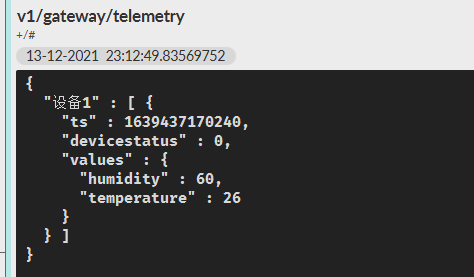
8. 想要通过mqtt接收数据,请连接mqttserver:42.193.160.84,1888 admin 000000;订阅topic: v1/gateway/telemetry
## 3D可视化(数字孪生?)

## 数据实时更新

## RPC反向控制

## 设备数据更新OPCUA服务端

## 接入组态项目

## 组态配置

## 通过MQTT订阅数据
# 运行
## windows主机运行:
1. [下载Releasev0.5.0](https://github.com/iioter/iotgateway/releases/download/v0.5.0/iotgateway-0.5.0-windows-x64.zip)发布版本
2. 解压release包,运行IoTGateway.exe
## linux-x64主机运行:
1. [下载Releasev0.5.0](https://github.com/iioter/iotgateway/releases/download/v0.5.0/iotgateway-0.5.0-linux-x64.zip)发布版本
2. 解压release包,运行IoTGateway
## linux-arm主机运行:
1. [下载Releasev0.5.0](https://github.com/iioter/iotgateway/releases/download/v0.5.0/iotgateway-0.5.0-linux-arm.rar)发布版本
2. 解压release包,运行IoTGateway
## linux/amd64,win/amd64 docker运行(官方仓)
1. docker run -d -p 518:518 -p 1888:1888 -p 62541:62541 -p 503:503 --name iotgateway --restart always 15261671110/iotgateway
后面还有 35 行代码,购买后查看完整代码
24 小时内免费解锁 3 个项目,之后 1 积分/个。 规则说明
AI 解读
登录后可用,每次 10 积分,解读结果公开显示在下面。
还没有人解读过这个文件。
