src/main/resources/static/samples/plugins/wsc/README.md
(开头部分) 4KB这里只显示每个文件的开头 60 行。登录后可以解锁完整代码。
WebSpellChecker Dialog Plugin for CKEditor 4
===============================
WebSpellChecker Dialog (WSC Dialog) provides distraction-free proofreading, checking the whole text’s spelling and grammar on-click in a separate pop-up window.
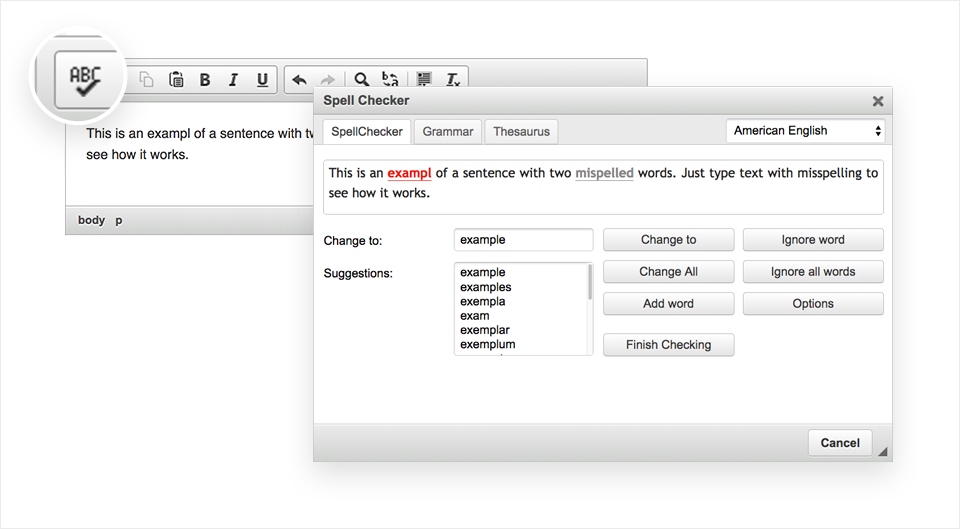
This plugin brings the multi-language WSC Dialog functionality into CKEditor 4. It is integrated by default starting with [Standard Package of CKEditor 4](https://ckeditor.com/ckeditor-4/download/). You can find it on the CKEditor 4 toolbar panel under the ABC button (Check Spelling).
If your version of CKEditor doesn’t have WSC Dialog built-in, you can easily add it by following the steps outlined in the Get Started section.
The default version of WSC Dialog plugin for CKEditor 4 is using the free services of WebSpellChecker. It is provided with a banner ad and has some [limitations](https://docs.webspellchecker.net/display/WebSpellCheckerCloud/Free+and+Paid+WebSpellChecker+Cloud+Services+Comparison+for+CKEditor).
To lift the limitations and get rid of the banner, [obtain a license](https://webspellchecker.com/wsc-dialog-ckeditor4/#pricing). Depending on your needs, you can choose a Cloud-based or Server (self-hosted) solution.
Demo
------------
WSC Dialog plugin for CKEditor 4: https://webspellchecker.com/wsc-dialog-ckeditor4/
Supported Languages
------------
The WSC Dialog plugin for CKEditor as a part of the free services supports the next languages for check spelling: American English, British English, Canadian English, Canadian French, Danish, Dutch, Finnish, French, German, Greek, Italian, Norwegian Bokmal, Spanish, Swedish.
There are also additional languages and specialized dictionaries available for a commercial license, you can check the full list [here](https://webspellchecker.com/additional-dictionaries/).
Get Started
------------
1. Clone/copy this repository contents in a new "plugins/wsc" folder in your CKEditor installation.
2. Enable the "wsc" plugin in the CKEditor configuration file (config.js):
config.extraPlugins = 'wsc';
That's all. WSC Dialog will appear on the editor toolbar under the ABC button and will be ready to use.
Supported Browsers
-------
This is the list of officially supported browsers for the WSC Dialog plugin for CKEditor 4. WSC Dialog may also work in other browsers and environments but we unable to check all of them and guarantee proper work.
* Chrome (the latest)
* Firefox (the latest)
* Safari (the latest)
* MS Edge (the latest)
* Internet Explorer 8.0 (limited support)
* Internet Explorer 9.0+ (close to full support)
Note: All browsers are to be supported for web pages that work in Standards Mode.
Resources
-------
* Demo: https://webspellchecker.com/wsc-dialog-ckeditor4/
* Documentation: https://docs.webspellchecker.net/
* YouTube video: https://youtu.be/bkVPZ-5T22Q
* Term of Service: https://webspellchecker.com/terms-of-service/
Technical Support or Questions
-------
后面还有 20 行代码,购买后查看完整代码
24 小时内免费解锁 3 个项目,之后 1 算力/个。 规则说明
AI 解读 AI
登录后可用,每次 10 算力,解读结果公开显示在下面。
还没有人解读过这个文件。
